Post
Asus Laptops Buying Guide: Choosing the Perfect Laptop for Every User
Jun
Asus Laptops Buying Guide: Choosing the Perfect Laptop for Every User
Introduction Asus Laptops Buying Guide
Choosing a laptop can be challenging, especially with the wide variety of models available today. Whether you’re a student attending online classes, a professional managing business projects, a gamer seeking high-performance hardware, or a content creator working with demanding applications, selecting the right laptop is essential for productivity and long-term satisfaction.
Among the leading laptop manufacturers, ASUS Official Website has earned a strong reputation for innovation, reliability, and value. ASUS offers an extensive range of laptops designed for different budgets and use cases, from affordable everyday notebooks to premium ultrabooks, gaming machines, and professional creator laptops.
This comprehensive buying guide will help you understand ASUS laptop families, key specifications, and the factors you should consider when choosing the perfect ASUS laptop for your needs.
Why Choose an ASUS Laptop?
ASUS has become one of the world’s most popular laptop brands for several reasons.
Key Advantages
Innovative Technology
ASUS frequently introduces cutting-edge features and hardware.
Wide Product Range
Options exist for virtually every type of user.
Excellent Value
Strong performance at competitive prices.
Quality Displays
Many ASUS laptops feature industry-leading screens.
Reliable Performance
Suitable for both everyday and professional workloads.
These strengths make ASUS a popular choice among students, professionals, gamers, and creators.
Understanding ASUS Laptop Series
One of the most important steps when buying an ASUS laptop is understanding its major product families.
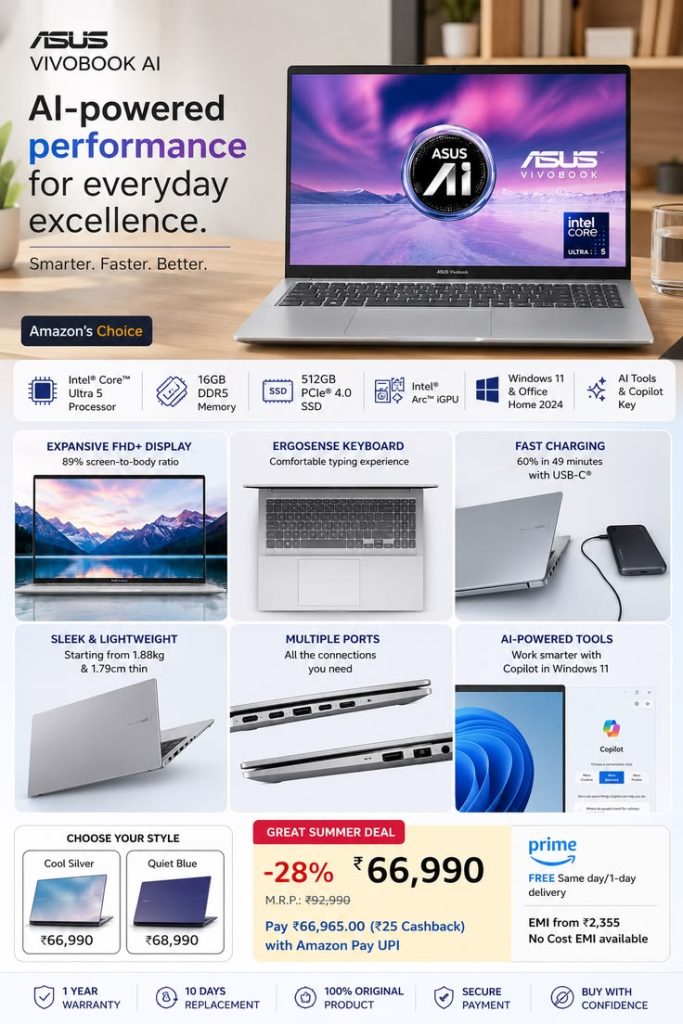
ASUS Vivobook Series


The ASUS Vivobook lineup focuses on affordability and everyday productivity.
Best For
- Students
- Home users
- Office workers
- Casual multitasking
Advantages
- Budget-friendly pricing
- Modern designs
- Reliable performance
- Lightweight construction
For most users, Vivobook offers excellent value.
ASUS Zenbook Series


The ASUS Zenbook family is ASUS’s premium productivity lineup.
Best For
- Professionals
- Remote workers
- Business users
- Frequent travelers
Advantages
- Premium build quality
- Lightweight design
- Long battery life
- High-end displays
Zenbook models compete directly with premium ultrabooks from other major brands.
ASUS ROG Series


The ASUS ROG lineup targets gamers and power users.
Best For
- Gamers
- Streamers
- Developers
- Power users
Advantages
- High-performance hardware
- Advanced cooling systems
- Dedicated graphics cards
- High-refresh-rate displays
ROG laptops are designed for maximum performance.
ASUS TUF Gaming Series
The ASUS TUF Gaming series offers gaming performance at more affordable prices.
Best For
- Budget gamers
- Students who game
- Casual creators
Advantages
- Strong value
- Durable construction
- Dedicated graphics
- Good gaming performance
TUF Gaming laptops balance cost and capability.
ASUS ProArt Series
The ASUS ProArt lineup is built specifically for creative professionals.
Best For
- Video editors
- Graphic designers
- Photographers
- 3D artists
Advantages
- Color-accurate displays
- Professional-grade performance
- Creator-focused features
ProArt laptops excel in demanding creative workflows.
Step 1: Identify Your Primary Use Case
Before selecting a model, determine how you plan to use the laptop.
Students
Typical Tasks:
- Online classes
- Assignments
- Research
- Microsoft Office
- Web browsing
Recommended Series
- Vivobook
- Zenbook
Suggested Specs
- Intel Core i5 / AMD Ryzen 5
- 8GB–16GB RAM
- 512GB SSD
Business Professionals
Typical Tasks:
- Presentations
- Virtual meetings
- Project management
Recommended Series
- Zenbook
- ExpertBook
Suggested Specs
- Intel Core Ultra 5 or Ultra 7
- 16GB RAM
- 512GB SSD
Content Creators
Typical Tasks:
- Video editing
- Graphic design
- Photography
Recommended Series
- ProArt
- Zenbook
Suggested Specs
- Intel Core Ultra 7 or higher
- 16GB–32GB RAM
- Dedicated GPU
Gamers
Typical Tasks:
- AAA gaming
- Streaming
- Content creation
Recommended Series
- ROG
- TUF Gaming
Suggested Specs
- Dedicated graphics card
- 16GB RAM or more
- High-refresh-rate display
Step 2: Choose the Right Processor
The processor significantly affects performance.
Intel Core i5 / AMD Ryzen 5
Suitable for:
- Students
- Office work
- Everyday productivity
Intel Core i7 / Ryzen 7
Suitable for:
- Multitasking
- Professional workloads
- Content creation
Intel Core Ultra / Ryzen AI Processors
Suitable for:
- Advanced productivity
- AI-assisted workflows
- Professional applications
Step 3: Select Enough RAM
RAM affects multitasking capabilities.
8GB RAM
Suitable for:
- Basic users
- Students
16GB RAM
Recommended for most users.
32GB RAM+
Recommended for:
- Creators
- Developers
- Power users
Step 4: Prioritize SSD Storage
Modern ASUS laptops typically use SSDs.
Recommended Capacities
512GB SSD
Ideal for most users.
1TB SSD
Better for creators and professionals.
2TB SSD+
Useful for large media libraries and projects.
SSD storage dramatically improves responsiveness.
Step 5: Consider Display Quality
The display affects both productivity and entertainment.
14-Inch Displays
Best balance of portability and usability.
15.6-Inch Displays
Ideal for multitasking and office work.
16-Inch Displays
Excellent for creators and gamers.
OLED Displays
Many ASUS laptops feature OLED technology.
Benefits include:
- Vibrant colors
- Deep contrast
- Better media experiences
OLED displays are one of ASUS’s strongest competitive advantages.
Battery Life Considerations
Battery performance is critical for mobile users.
Students
Look for:
- 8–12 hours
Professionals
Look for:
- 10–15 hours
Frequent Travelers
Consider premium Zenbook models with optimized battery life.
Recommended ASUS Laptops by User Type
| User Type | Recommended Series |
|---|---|
| Students | Vivobook |
| College Students | Vivobook, Zenbook |
| Remote Workers | Zenbook |
| Business Users | Zenbook, ExpertBook |
| Gamers | ROG, TUF Gaming |
| Creators | ProArt, Zenbook |
| Developers | Zenbook, ROG |
| Everyday Users | Vivobook |
Common Buying Mistakes to Avoid
Choosing Too Little RAM
May limit future performance.
Buying More Power Than Needed
Can waste money.
Ignoring Display Quality
Affects daily usability.
Prioritizing Storage Over Performance
Balance all specifications.
Focusing Only on Gaming Features
Ensure the laptop fits your actual needs.
Making informed choices leads to better long-term satisfaction.
Future Trends in ASUS Laptops
ASUS continues investing in:
AI-Powered Productivity
Improve efficiency.
Better OLED Displays
Enhance visual experiences.
Longer Battery Life
Support mobility.
Sustainable Manufacturing
Reduce environmental impact.
Advanced Cooling Technologies
Improve performance consistency.
These innovations continue strengthening ASUS’s position in the laptop market.
Conclusion
Choosing the perfect ASUS laptop starts with understanding your needs, workload, and budget. The Vivobook series offers excellent value for students and everyday users, Zenbook provides premium productivity and portability, ROG and TUF Gaming deliver powerful gaming performance, while ProArt serves creative professionals with specialized features and exceptional displays.
By evaluating processor performance, memory, storage, display quality, battery life, and intended use, you can confidently select an ASUS laptop that supports your work, study, entertainment, or creative goals for years to come.
